
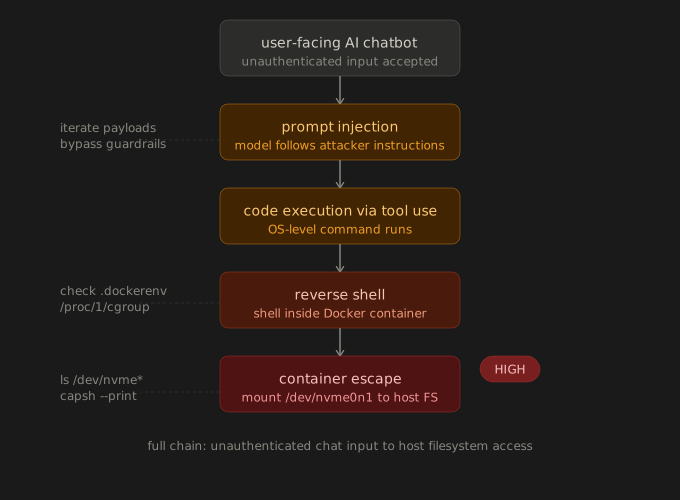
This is one of the more interesting finds I have had and it is worth writing up even with the heavy redactions. I was testing a client-facing AI chatbot, the kind that is bolted onto a web app to handle user interactions. The chatbot was backed by an LLM and had some degree of tool use, meaning it could call back into the application to perform actions on behalf of the user.
The initial vector was prompt injection. I crafted inputs that caused the model to deviate from its intended behavior and execute instructions I was providing rather than following its system prompt. This is not always straightforward because modern models are somewhat resistant to naive injection attempts, but with enough iteration on the payload structure I was able to get the model into a state where it would process and act on my instructions.
From there it got more interesting. The chatbot had access to a code execution capability, something that let it run snippets to handle certain requests. Through the injection I was able to get it to execute OS-level commands. At that point I had code execution on whatever was hosting the chatbot.
Getting a Shell
Standard reverse shell from there. The application was running inside a Docker container, which is typical for this kind of deployment. I had a shell inside the container, which by itself is interesting but limited.
Container Escape
This is where it became a high severity finding. The container was running with a misconfiguration that is more common than it should be. The container had elevated capabilities that allowed device access. The technique I used was mounting the underlying host filesystem by accessing the host block device directly through /dev. In AWS-hosted environments this often surfaces as an NVMe device such as /dev/nvme0n1 that is accessible from inside a privileged or misconfigured container.
Once I had the host filesystem mounted I could read and write files on the underlying host, access credentials, modify startup scripts, and effectively move laterally beyond the container boundary entirely.
Why It Rated High
The full chain was: unauthenticated user input into the chatbot, prompt injection to bypass the model guardrails, code execution through an exposed tool, shell in the container, then container escape to the underlying host. Any one of those steps is a finding on its own. Chained together they represent full compromise of the host infrastructure from a user-facing chat interface, which is the kind of thing that gets the client attention in the debrief.
What to Look For
If you are testing an AI chatbot, especially one with any kind of tool use or code execution capability:
- Test for prompt injection systematically. The model behavior under adversarial input is part of the attack surface.
- If you get any kind of execution, check whether you are inside a container. Look for .dockerenv at the filesystem root or check /proc/1/cgroup.
- Check Docker socket exposure: ls -la /var/run/docker.sock
- Check for NVMe or other block devices: ls /dev/nvme*
- Check container capabilities: capsh –print or cat /proc/self/status | grep Cap
The combination of AI tooling and containerized deployment is increasingly common and the security posture of that stack is often not keeping up with the deployment pace.